





About Lethal Sniper 3D: Army Soldier
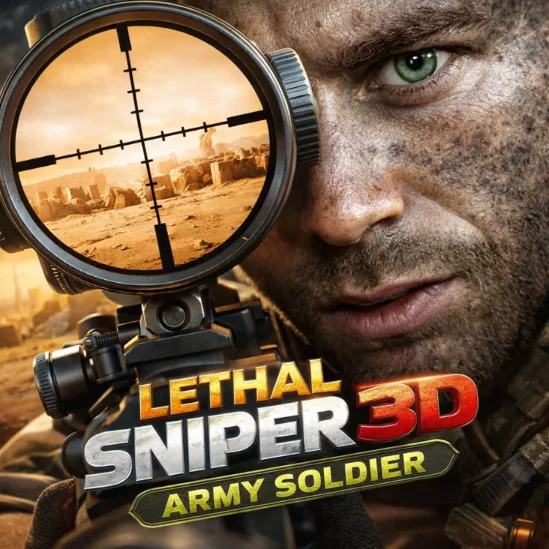
Lethal Sniper 3D: Army Soldier is a mission-based shooting game developed by PaperBunker. Instead of sending you through the battlefield as a conventional infantry soldier, it places you in a fixed sniper position overlooking military combat zones.
Every assignment gives you a specific objective. You may need to identify and eliminate a designated enemy, stop a threat before it reaches allied soldiers, locate hidden opponents, or support a unit from a distance.
Accurate shooting requires more than moving the crosshair onto a target. The scope sways with the sniper's breathing, distant enemies may be difficult to identify, and ammunition should not be wasted on unnecessary shots.
Special tools add tactical options to the missions. Thermal vision helps reveal difficult-to-see targets, while an airstrike can attack an area that would be difficult to clear with the rifle alone.
Lethal Sniper 3D: Army Soldier runs directly in a desktop web browser. Its mouse aiming and keyboard commands are designed for players who enjoy deliberate sniper gameplay based on observation, timing, and accuracy.
How to Play
- Read the mission briefing before firing. The objective determines which soldiers are valid targets and what conditions must be met to complete the operation.
- Press L to lock the cursor inside the game window. Move the mouse to scan the battlefield and use the mouse wheel to adjust the scope magnification. Begin with a wider view so you can understand the area, then zoom in after identifying a likely target.
- When preparing a long-range shot, hold Shift to control your breathing and reduce the movement of the scope. Wait for the crosshair to settle over the target before firing.
- If enemies are concealed by darkness, smoke, distance, or environmental objects, activate thermal vision with Space. When the mission makes an airstrike available, press X to attack a selected area or deal with a group of threats.
Controls
Tips & Tricks
- Read every objective carefully. Some missions require a particular target rather than the elimination of every visible enemy.
- Lock the cursor with L before aiming. This prevents accidental movement outside the game window.
- Scan at low magnification first. A wider field of view makes it easier to understand the battlefield and locate movement.
- Zoom in only after finding a likely target. Excessive magnification can make the scope difficult to control.
- Hold Shift shortly before firing. Using breath control too early can waste its most stable period.
- Aim for a clear part of the target. Do not shoot through an obstacle unless the mission clearly demonstrates that the line of fire is unobstructed.
- Use thermal vision when ordinary observation is not enough. Look behind environmental objects and inside darker areas.
- Preserve ammunition. A missed shot may leave you without enough bullets to complete a later stage of the operation.
FAQ
How do I call an airstrike?
Press X during a mission that provides airstrike support. Use it carefully because it affects an area rather than one precise target.
Why is my mouse leaving the game window?
Click inside the game and press L to lock the cursor. Press L again when you need to release it.
Who developed Lethal Sniper 3D: Army Soldier?
The game was created by PaperBunker, the developer behind browser titles such as The Pillar and Goat vs Zombies.
How do I steady the sniper scope?
Hold Shift to control the sniper's breathing. Use this shortly before firing to reduce scope sway.
How do I zoom the rifle scope?
Move the mouse wheel forward or backward to change the magnification level.
What does thermal vision do?
Thermal vision helps reveal targets that are difficult to see in ordinary view. Press Spacebar to activate it when available.
Do I need to download the game?
No. The web version runs directly in a compatible desktop browser without requiring a traditional installation.
More Browser Games to Try
- Fortzone Battle Royale – Fortzone Battle Royale is a 3D survival shooter in which you enter a large battlefield and fight to become the last competitor standing.
- Space Wars Battleground – Space Wars Battleground is an online third-person shooting game set in a futuristic combat arena.
- Moon Clash 3D – Moon Clash 3D, officially known as Moon Clash Heroes, is a futuristic third-person shooting game developed by Freeway Interactive.
- Vegas Clash 3D – Vegas Clash 3D is a 3D third-person shooting game developed by Freeway Interactive.
- Rocket Clash 3D – Rocket Clash 3D is a fast-paced third-person shooting game developed by Freeway Interactive.
- Sniper Clash 3D – Sniper Clash 3D is a team-based third-person shooting game developed by Freeway Interactive.
- Subway Clash 3D – Subway Clash 3D is a fast-paced third-person shooting game developed by Freeway Interactive.